
上一篇
AngularJS如何与后台服务器交互?示例讲解来了!
AngularJS作为一款经典的前端JavaScript框架,其强大的数据绑定和依赖载入特性使其在构建动态单页应用时具有独特优势,与后台服务器进行数据交互是前端开发的核心需求之一,本文将通过具体示例讲解AngularJS实现前后端交互的常用方法,包括$http服务、RESTful API调用及数据绑定等关键技术。
核心交互工具:$http服务
AngularJS通过内置的$http服务与后台进行异步通信,该服务基于Promise API,支持GET、POST、PUT、DELETE等多种HTTP请求方式。$http服务封装了XMLHttpRequest对象,简化了AJAX操作,开发者只需配置请求参数即可完成数据交互。
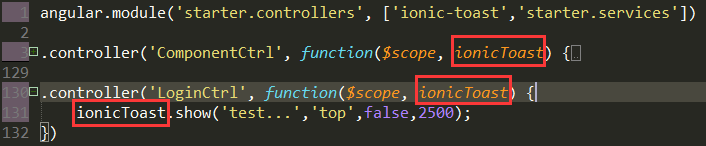
基础GET请求示例:
app.controller('UserController', function($scope, $http) { $http.get('/api/users') .then(function(response) { $scope.users = response.data; // 成功回调 }, function(error) { console.error('请求失败', error); // 错误回调 }); });
RESTful API的完整调用流程
在实际项目中,前后端交互通常遵循RESTful规范,以下以用户管理为例,展示完整的CRUD操作实现。
数据模型定义
在控制器中初始化数据模型:
$scope.user = { id: null, name: '', email: '' }; $scope.users = [];
创建(POST)与读取(GET)
// 获取用户列表 $scope.getUsers = function() { $http.get('/api/users').then(function(response) { $scope.users = response.data; }); }; // 创建新用户 $scope.createUser = function() { $http.post('/api/users', $scope.user).then(function(response) { $scope.users.push(response.data); $scope.user = { id: null, name: '', email: '' }; // 重置表单 }); };
更新(PUT)与删除(DELETE)

// 更新用户 $scope.updateUser = function() { $http.put('/api/users/' + $scope.user.id, $scope.user).then(function(response) { var index = $scope.users.findIndex(u => u.id === $scope.user.id); if (index !== -1) { $scope.users[index] = response.data; } }); }; // 删除用户 $scope.deleteUser = function(id) { $http.delete('/api/users/' + id).then(function() { $scope.users = $scope.users.filter(u => u.id !== id); }); };
表单数据绑定与提交
AngularJS的ng-model指令实现了表单与数据模型的双向绑定,简化了数据收集过程,以下是一个完整的用户表单示例:
<form ng-submit="saveUser()"> <input type="hidden" ng-model="user.id"> <div> <label>姓名:</label> <input type="text" ng-model="user.name" required> </div> <div> <label>邮箱:</label> <input type="email" ng-model="user.email" required> </div> <button type="submit" ng-show="!user.id">创建</button> <button type="submit" ng-show="user.id">更新</button> </form>
对应的控制器方法:
$scope.saveUser = function() { if ($scope.user.id) { $scope.updateUser(); } else { $scope.createUser(); } };
错误处理与响应拦截
为提升应用健壮性,可通过拦截器统一处理HTTP请求错误:
app.config(function($httpProvider) { $httpProvider.interceptors.push(function($q) { return { 'responseError': function(rejection) { if (rejection.status === 401) { // 未授权处理 } else if (rejection.status === 500) { // 服务器错误处理 } return $q.reject(rejection); } }; }); });
性能优化建议
- 数据缓存:对不常变化的数据使用$http的cache参数启用缓存
- 防抖处理:对频繁触发的搜索请求添加防抖逻辑
- 分页加载:通过limit和offset参数实现数据分页,避免一次性加载大量数据
通过以上技术组合,AngularJS能够高效实现与后台服务器的数据交互,在实际开发中,还需根据项目需求选择合适的后端技术栈,并注意跨域配置、数据格式统一等细节问题,以确保前后端通信的稳定性和安全性。
相关文章
-
VPS性能优化教程怎么做?Making Implicit Concepts Explicit隐式概念显式化原则
-

VPS性能优化教程,Language of the Domain领域语言原则是什么?
-
VPS性能优化教程,Binding Model绑定模型实现原则是什么?
-
VPS性能优化教程怎么做?VPS性能优化方法详解
-
VPS性能优化教程怎么做?VPS优化方法详解
-

VPS性能优化教程,Refactoring Toward Deeper Insight重构深入洞察原则,VPS如何进行性能优化?
-

VPS性能优化教程:Hands-On Modelers实践建模者原则
-
AS4837青云互联悉尼VPS路由分析,青云互联悉尼VPS怎么样







