
上一篇
PHP项目如何绑定域名?详细步骤与配置教程解析
在PHP项目中绑定域名,主要涉及Web服务器配置和域名DNS解析两个步骤,以下是详细操作流程:
DNS解析配置(域名指向服务器)
-
获取服务器IP地址
登录你的服务器(如云服务器),查看公网IP地址(如 123.123.123)。
-
域名解析设置
进入域名注册商(如阿里云、GoDaddy)的DNS管理后台:
- 添加一条 A记录
- 主机记录:(主域名)或 www(子域名)
- 记录值:填写服务器IP地址
- TTL:默认值(如600秒)
示例:
域名 example.com 解析到 123.123.123
www.example.com 同样解析到该IP
- 添加一条 A记录
Web服务器配置(绑定域名到项目目录)
方案1:Apache服务器(推荐)
-
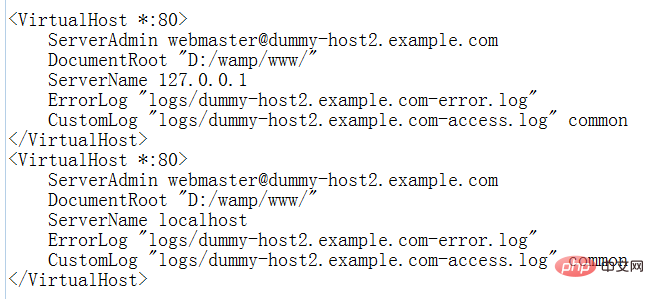
修改虚拟主机配置文件
编辑Apache的虚拟主机文件(路径根据系统不同):
- Ubuntu: /etc/apache2/sites-available/000-default.conf
- CentOS: /etc/httpd/conf/httpd.conf 或 /etc/httpd/conf.d/vhost.conf
-
重启Apache生效
sudo a2ensite 000-default.conf # 启用配置(Ubuntu) sudo systemctl restart apache2 # 重启服务
-
修改Nginx配置文件
编辑站点配置文件(如 /etc/nginx/conf.d/example.conf):
server { listen 80; server_name example.com www.example.com; root /var/www/html/your_project; index index.php index.html; location / { try_files $uri $uri/ /index.php?$query_string; } location ~ .php$ { include fastcgi_params; fastcgi_pass unix:/var/run/php/php8.1-fpm.sock; # 根据PHP版本调整 fastcgi_index index.php; fastcgi_param SCRIPT_FILENAME $document_root$fastcgi_script_name; } } -
重启Nginx生效
sudo nginx -t # 测试配置是否正确 sudo systemctl restart nginx - 修改hosts文件
- Windows: C:WindowsSystem32driversetchosts
- Linux/Mac: /etc/hosts
添加一行: 0.0.1 example.com
- 浏览器访问 http://example.com 即可本地调试。
- 浏览器访问你的域名(如 http://example.com)。
- 检查项目是否正常加载,无404错误。
-
403 Forbidden 错误
- 检查项目目录权限:chmod -R 755 /var/www/html/your_project
- 确保目录所有者正确:chown -R www-data:www-data /var/www/html/your_project(Apache用户)
-
域名无法访问
- 检查DNS解析是否生效:ping example.com 查看IP是否正确
- 确认服务器防火墙放行80端口(HTTP)或443端口(HTTPS)
-
PHP文件不解析
- Apache:确保已安装 libapache2-mod-php 并启用
- Nginx:检查 fastcgi_pass 指向的PHP-FPM地址是否正确
- 申请SSL证书(推荐Let’s Encrypt免费证书)。
- 在Web服务器配置中监听443端口并加载证书。
- 强制HTTP跳转HTTPS(提升安全性)。
进阶:HTTPS配置(可选)
通过以上步骤,你的域名已成功绑定到PHP项目!
方案2:Nginx服务器
本地测试(可选)
在开发阶段,可通过修改本地hosts文件模拟域名解析:
验证是否成功
常见问题排查







